Notifications, Delay Reasons, Norm Suggestions, and Automatic Assignment
Four tools that complement work dispatch: alerts for foremen, "why longer" questions with root cause analysis, suggestions for outdated time norms, and automatic task assignment.
The "Work Dispatch" page shows who is doing what. But a foreman can't watch it all day. They need the system to tell them when something goes wrong, ask a person why an operation is taking too long, and suggest who should be assigned the next job.
This article is about four tools that do just that. All of them are configured in Factory Configuration → Rules for the entire business, factory, or a specific shop floor.
1. Foreman Notifications
Every five minutes, the system checks for three situations.
- Person without work. They clocked in but haven't had an operation or task for longer than the set time.
- Operation longer than usual. It's taking longer than the threshold set in the dispatch rules.
- Urgent order without an assignee. Only a few days remain until the deadline, and no one has started on the batches yet.
Where notifications arrive
- In the Oprela bell icon;
- In Telegram, if the bot is connected;
- Via email.
They are received by the foremen of the respective shop floor, and optionally by management.
Where they are visible
All active alerts are collected in the yellow "Requires Attention" block at the top of the work dispatch page.
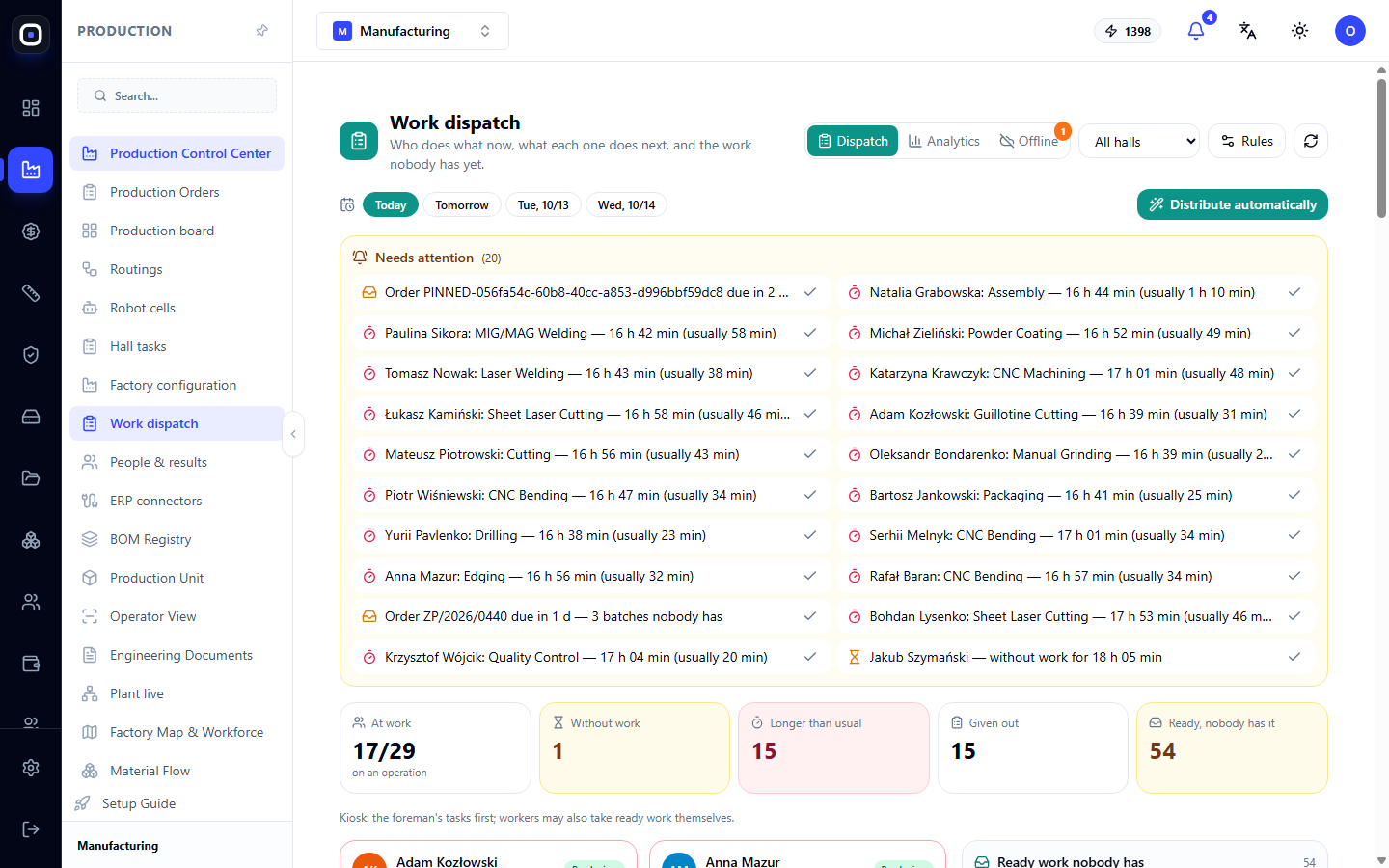
A checkmark next to an alert means "I see it": it stops repeated reminders. When the situation passes, the alert closes automatically.
"Notifications" group rules
- "Without work longer than", in minutes. Zero disables this alert.
- "Operation longer than usual" — whether to alert about this.
- "Urgent orders without assignee", in days until the deadline.
- "Remind again after" — how often to repeat if no one has responded.
- Who to send to and by what channels.
Don't set thresholds too strict. If a foreman receives thirty notifications an hour, they will stop reading them. Start with soft values and gradually tighten them.
2. Why longer than usual
Knowing that an operation is delayed is not enough. You need to know why.
How it looks for the employee
If an operation took significantly longer than usual, the terminal displays large buttons with reasons after completion: waiting for material, retooling, machine problem, learning, complex part, helping others.
The employee selects one with a single tap and can optionally add a few words. This takes two seconds.
Reasons directory
The list of reasons is your factory's directory: Factory Configuration → Categories & Reasons → "Why longer than usual".
Until the factory has its own reasons, standard ones apply. The Make your own button allows you to rename them, hide unnecessary ones, or add your own.
Keep the list short. Six to eight reasons are enough. If there are twenty, people will choose the first one they see.
"Delays & Norms" group rules
- "Ask why long" — enables the question.
- "Ask from" — from what excess, e.g., 130 percent of the usual time.
- "Reason required" — whether the question can be skipped.
Analytics
The answers are summarized on the Analytics tab of the work dispatch page.
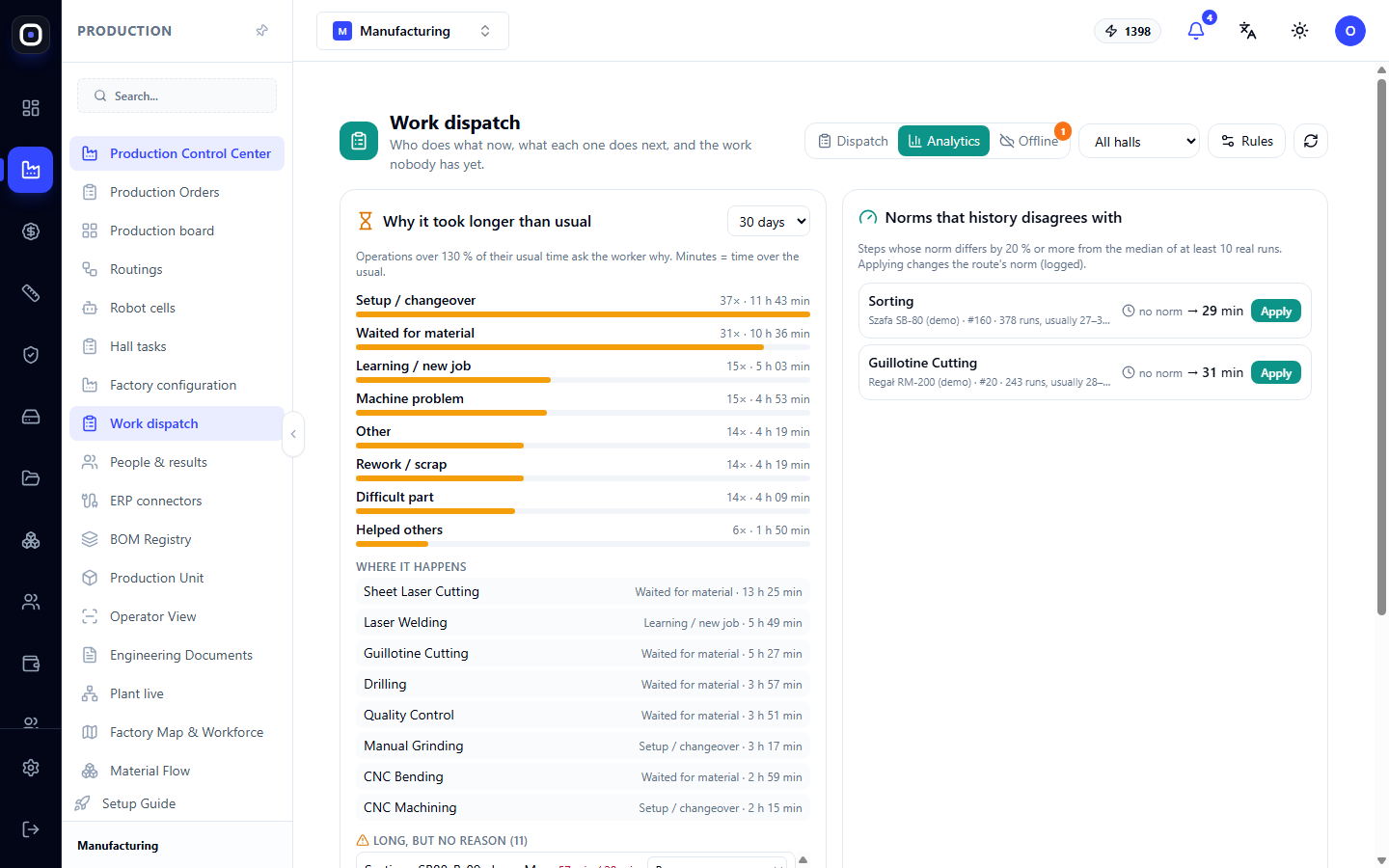
It shows:
- which reasons take the most time — with bars, number of cases, and total time;
- on which operations this happens;
- a list of long operations without a reason. The foreman can add it.
This is the most valuable thing this tool provides. A single case says nothing. But if "waiting for material" accumulated forty hours in a month, and almost all of it was on laser cutting, you know exactly what to fix: sheet delivery to the laser.
3. Norm Suggestions
The time norm in a routing becomes outdated over the years. A faster machine was bought, tooling was changed, people gained experience, but the same number is still in the routing.
Below the analytics, there is a "Norms that history disagrees with" block. It shows routing steps whose norm significantly differs from what it actually is.
"Actually" means the median of actual executions. A suggestion appears only when enough executions have accumulated to be trustworthy.
The owner or administrator clicks Apply, and the step's norm is updated. Each such change is recorded in a log: who, when, from what value to what.
Rules
- "Suggest norm from" — from what percentage discrepancy.
- "Executions for suggestion" — how many actual executions are needed.
Correct norms are important not only for this page. Order deadlines, people's workload, and cost are calculated from them. One outdated norm spoils all three.
4. Planning Ahead
Above the employee cards, there is a day switcher: Today, Tomorrow, and so on.
For another day, only those who have a shift then are shown. A task assigned for a specific day will appear for the employee on that day.
Why this is useful. At the end of the shift, the foreman assigns work for the morning. People come in and immediately know what to do, instead of waiting half an hour for him to figure it out.
The "Plan ahead up to" rule sets how many days in advance work can be assigned.
5. Automatic Assignment
The Assign Automatically button suggests who does what. The system chooses by the following priority order:
- skills — who knows how to do this operation;
- who is currently free;
- own machine — it's easier for a person to work on their own machine;
- the same operation as recently — fewer changeovers;
- least workload — so that work is distributed evenly.
This is a suggestion. The foreman sees the list, unchecks what doesn't fit, and clicks Assign.
"Work Dispatch" group rules
- "Automatic: tasks per person" — how many tasks the system can give to one person.
- "Only to those who know how" — do not suggest people without the required skill.
- "Preference for own machine".
- "Keep people on the same job".
Automatic assignment is only as good as the accuracy of skills in the personnel register. If a person knows an operation but it's not recorded in the system, they won't be included in the suggestion.
Where to start
Don't enable everything at once.
- Week one. Enable only the "person without work" alert with a soft threshold.
- Week two. Enable the "why longer" question without making it mandatory.
- After a month. Open the analytics. Draw one conclusion and make one change.
- After two months. Review the norm suggestions and apply those you agree with.
- When skills are recorded. Start using automatic assignment.
Frequently Asked Questions
Too many notifications
Loosen the thresholds or increase the repeat reminder interval. An alert that no one reacts to is worse than no alert at all.
Employees always choose the same reason
The list is too long or the reasons are unclear. Shorten it and rename the reasons with simple words.
No norm suggestions
Not enough executions. A suggestion appears only when there is enough real data.
The "longer than usual" alert triggers for overnight operations
Most likely, someone didn't complete the operation before leaving. This is not a delay, but an accounting error. Close the operation.
Automatic assignment gives everything to one person
Decrease the value of the "Automatic: tasks per person" rule.