Shop Hub: Your Unified Store Panel
A unified entry point to all store functions: today's sales, inventory, quick links.
Shop Hub unifies all e-commerce store functions under one menu — some screens here are unique (Overview, Analytics, Customers, Partners), while others are the same pages as in the rest of the ERP (Orders, Discounts, Shipping), simply gathered in one place for convenience.
Where to Find
/shop — the dedicated sidebar menu with 16 items: Overview, Analytics, Storefronts, Orders, Returns, Products, Bulk Edit, Categories & Navigation, Discounts, Gift Cards, Shipping, Customers, Partners, Payments, Integrations, Settings.
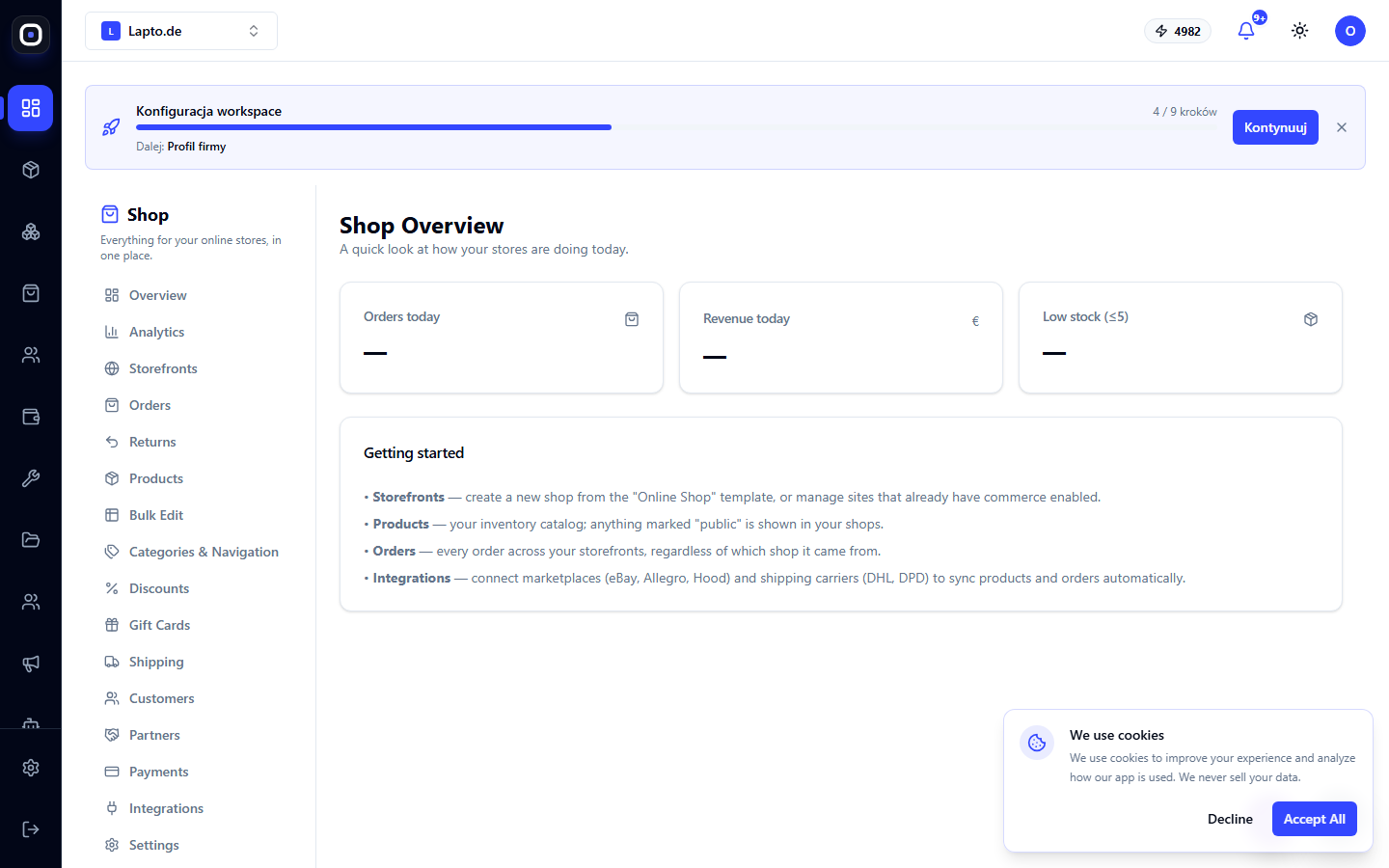
Overview
The main dashboard of the hub: number of orders today, revenue for today, number of products with low stock — a quick morning glance at the store's status without navigating through separate pages.
What's Unique Here, and What's Already Familiar
- Hub's own screens: Overview, Analytics, Storefronts, Customers, Gift Cards, Integrations, Settings — see separate articles below.
- Shared with the old ERP: Orders, Returns, Products, Bulk Edit, Categories & Navigation, Discounts, Shipping, Payments — these are the same pages documented under their usual names (Working with Orders, Returns and RMAs, Product Catalog, etc.), simply embedded here for convenience — no need to learn how to use them again.