eBay: Listing Manager and Listing Items
Creating an eBay listing from a product card, managing active listings, and linking to the catalog.
After connecting your account, you can list items directly from Oprela.
Where to find it
The Orders & Sales module → eBay — Listing Manager (…/erp/ebay); the listing form is List form (…/erp/ebay/list-form).
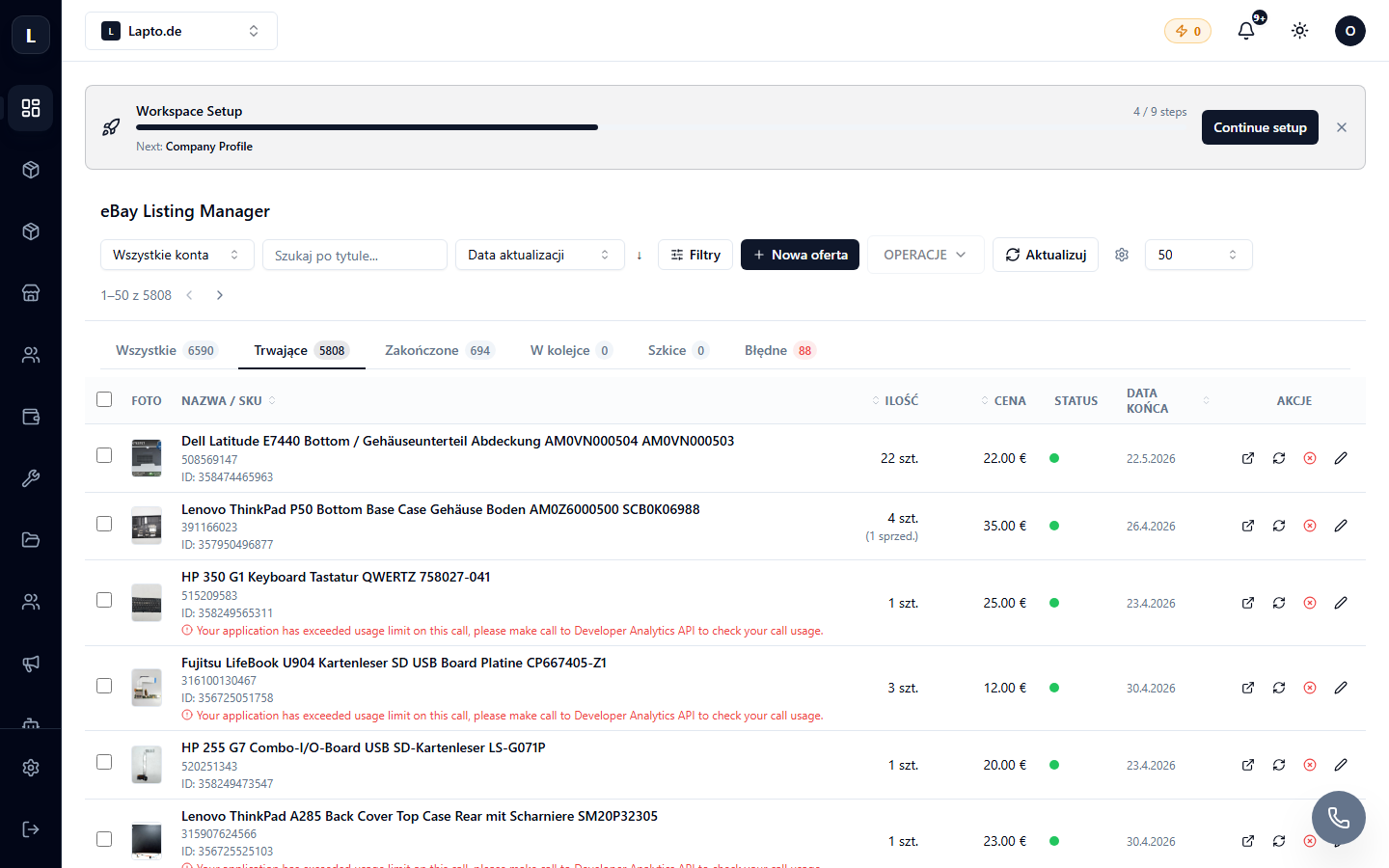
Listing an item
- In the manager, click List item (or from the product card, click "Publish to eBay").
- Select an item from the catalog — the name, photo, price, and condition will be pulled automatically.
- Select an eBay category and item specifics. The AI assistant can fill in parameters based on the description — see the AI params button.
- Select a design template and shipping/return policies.
- Publish — the listing will appear on eBay in minutes.
Listing Manager
- All active/ended listings with prices and quantities;
- Bulk actions: change price, end, relist;
- Links — links between listings ↔ catalog items, if the listing was created outside Oprela.
Best Offers
Price offers from buyers are collected on the Best Offers page — accept or decline in bulk.
Read next
- eBay: Photo Templates
- Manufacturers and GPSR — mandatory data for listings
- Sync Health