Receiving After Cutting: How to Report Cut Parts
A simple screen for the cutting operator: select a released job, specify the cut blank, and confirm what was obtained from it. This is crucial for reconciliation and inventory accounting.
The technologist nested parts on a pipe or sheet and released the job. The operator cut it. But the system only knows about this when the operator reports it.
The "Receiving After Cutting" page is for this very purpose. It's the cutting operator's screen: three steps, large buttons, nothing superfluous.
Why Report
Until the operator reports, cut parts do not exist for the system. The consequences are immediately noticeable:
- The next operation cannot start because the parts are "not yet ready."
- In the cutting reconciliation, the job appears as incomplete with a note "this part has not yet been reported."
- The blank's remnant does not go into stock, and next time, a new blank will be cut for the same part.
Reporting takes half a minute, but its absence stops the chain.
Where to Find the Page
The page opens at an address ending in …/erp/production/nesting-shop-floor. It is usually opened on a tablet near the cutting machine and left open.
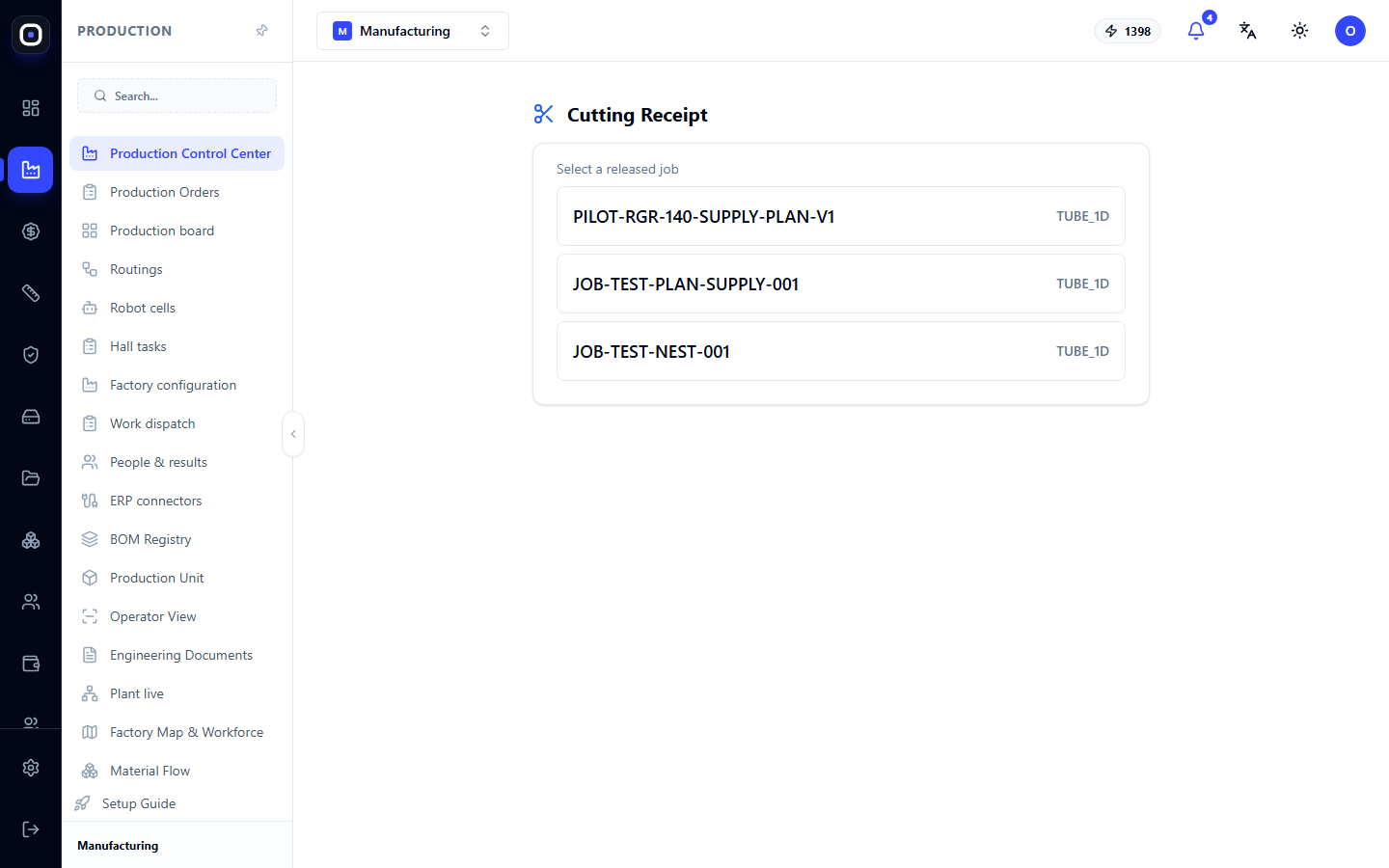
Step 1. Select a Released Job
The first screen says "Select a released job" and shows a list. Each row is one cutting job: its code on the left and material type on the right.
Material types are of two kinds:
- TUBE_1D — pipe or profile;
- SHEET_2D — sheet.
Only released jobs are in the list. If the required job is not there, the technologist has not yet released it to production: it is still in drafts or without ready files.
Click on the row with your job.
Step 2. Select the Blank
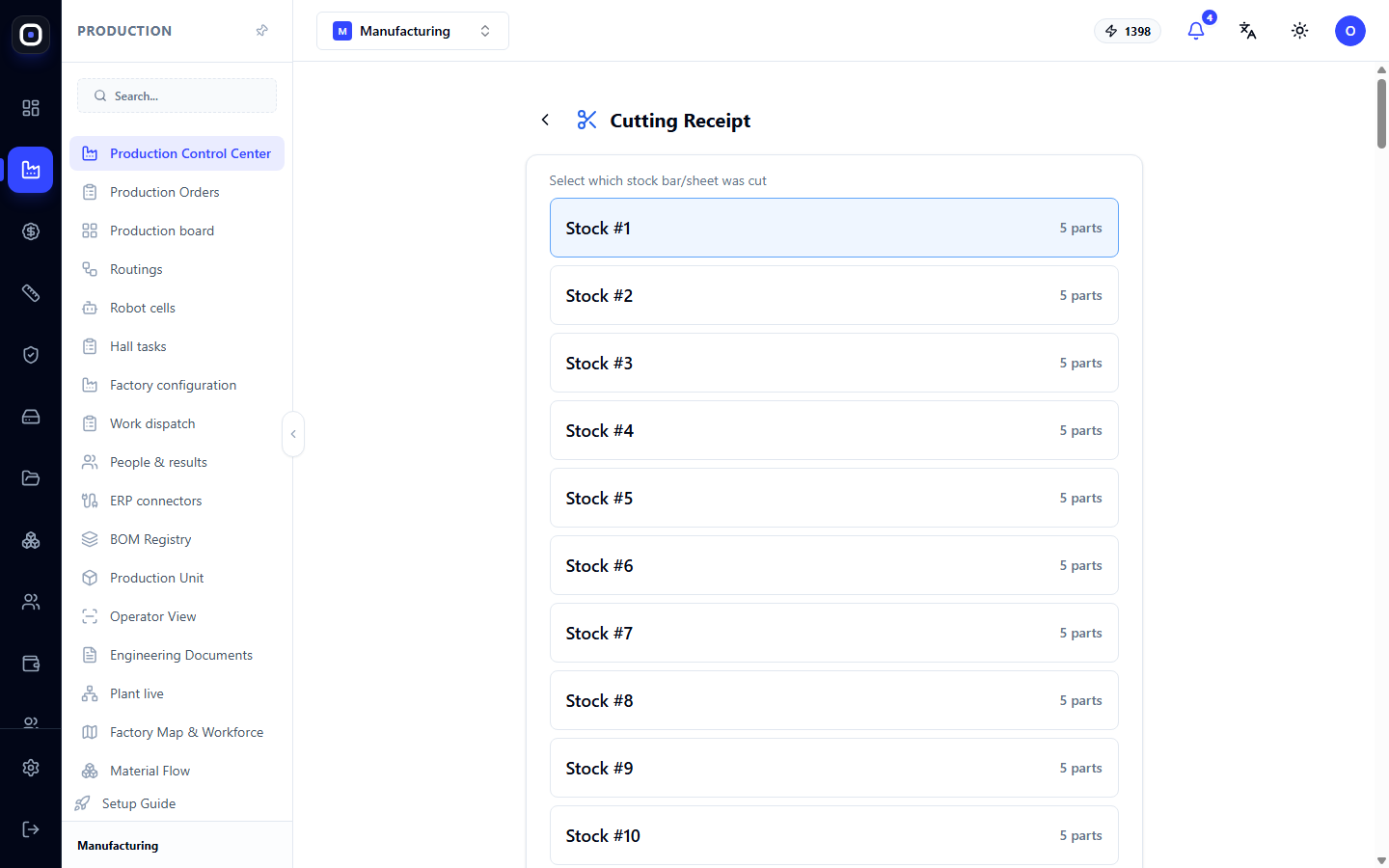
A job consists of blanks. A blank is one pipe or one sheet on which parts are nested.
The screen asks which blank you cut and shows a list: Blank #1, Blank #2, and so on. To the right of each, it says how many parts are obtained from it.
The blank number matches the number in the machine program. If you cut the third pipe, select "Blank #3".
The arrow to the left of the header returns to the job list.
Step 3. Confirm the Result
After selecting the blank, the screen shows what should have been obtained from it. You confirm how many parts were actually received.
If everything was cut as planned, you confirm the planned quantity. If some parts did not turn out (machine malfunction, material defect), you specify the actual quantity.
Here, you also record the remnant: a piece of pipe or sheet that remained and is still usable. If it is not recorded, a warning will appear in the reconciliation that the blank has waste, and the remnant was not recorded.
Report immediately after each blank, not at the end of the shift. This way, the next operation receives parts immediately, and you won't forget anything.
What Happens After Reporting
- Parts become ready. They can be taken for the next operation: bending, welding, drilling.
- Reconciliation is updated. In the "Reconciliation" section of the cutting page, the "Produced" number increases, and "Missing" decreases.
- Remnant goes into stock. The next cutting will try to use it first.
- Utilization is recalculated. The indicator on the cutting page reflects how much material went into parts.
Typical Operator Workflow
- Open the page on a tablet near the machine.
- Select the job you are cutting.
- Cut the blank according to the program.
- Select the number of the cut blank.
- Confirm the quantity of received parts.
- Record the remnant, if it is usable.
- Proceed to the next blank.
Frequently Asked Questions
My job is not in the list
It has not been released to production. Contact the technologist: the job must have the "Released" status on the cutting page.
I selected the wrong blank
Go back with the arrow and select the correct one before confirming the result. If you have already confirmed, inform the foreman: corrections are made in the reconciliation section.
Fewer parts were cut than planned
Specify the actual quantity. The system will show the difference in the reconciliation, and the technologist will plan for what is missing.
Is it mandatory to record the remnant?
Yes, if the piece can still be used. Otherwise, it will disappear from accounting, and a warning will remain in the reconciliation.
How does this page differ from the "Nesting" page?
"Nesting" is the technologist's workplace: where jobs are planned, nested, and released. "Receiving After Cutting" is the operator's workplace: where only what has been done is reported.